Download DARA
One installer gets you the mixer and its audio driver.
DARA is a Windows app, so you’ll need your PC to install it.
Need a license? Buy DARA.
On this page
Requirements
| Operating system | Windows 10 version 2004 or later, or Windows 11. x64 PCs only. Arm PCs aren’t supported. |
|---|---|
| WebView2 | Microsoft Edge WebView2 Runtime. Windows 11 already includes it. Some Windows 10 PCs need it installed from Microsoft first. |
| Install | Admin rights once, for the audio driver. |
| Audio | The headset, speakers, interface or mic you already have. |
| Internet | For activation and updates. Mixing works offline. |
Install
- Run the installer. Windows asks for admin rights once, for the audio driver.
- Activate. DARA asks for your key the first time it opens. Paste the key from your purchase email.
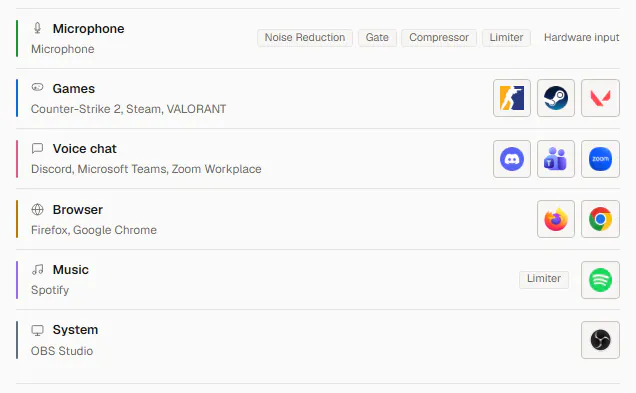
- Pick what you use your PC for. DARA puts your apps on channels, and anything else plays in System.
- Point your other apps at the desired DARA virtual audio device. Each mix shows up as a recording device, and setup shows you where to pick it in Discord, OBS or Zoom.

Uninstall
In Windows Settings, open Installed apps, find DARA and choose Uninstall. Your scenes and settings stay on the PC. Afterwards, check which audio device Windows uses by default, because it can change.
Uninstalling doesn’t free this PC’s license slot. To free it, open Settings, then License, and choose Deactivate this installation before you uninstall.
If something’s wrong
No DARA devices in Windows sound settings
DARA adds a device for each channel and mix you make, named after it, like STREAM. Open DARA and finish first-time setup, or add a channel. If you still don’t see any, run the installer again and accept the admin prompt.
DARA’s status bar says “audio device error”
DARA lost the output it was playing to. Usually a USB interface got unplugged, or another program took the device for itself. Pick an output again in the master section.
An app won’t move to a channel
Some apps pick their own audio device. Pick the matching DARA device in the app’s audio settings, or restart the app so it lets go of the device it had.
Anything else
Email support@daraaudio.com with the version number from DARA’s status bar and the exact error. Keep your key private. If we need it, send only the last four characters.